VERAX

The black box for your AI agents.

Whatever your agent did, VERAX has it in writing: who asked, which rule allowed it, what was done, whether the money was matched. Every line signed. The record stays on your machine; if it changes later, it shows.

Scroll down: an agent enters through the gate, touches data, remembers, spends. Every step signed.

You draw your agent's limits

One agent's day, in four stops. Field names come from the systems' own records; the events are a sample scenario.

GateVERAX

No token, no entry

Claude, Cursor, Codex; it makes no difference. Every agent enters VERAX with a token you issued. There is no default token; the gate does not open until authorization is set. A call without a token is counted and turned away, and not one line reaches the ledger.

call:   no token
result: turned away · counted · no record

You split the scopes

Read, memory, act, pay, approve and audit are granted one by one. A reader cannot approve. A request with no rule is refused, and the refusal is signed just like a permission.

request:  approve a payment · agent scope: read
decision: refused · refusal signed

DataConarium

Masked before the model sees a character

The agent reads the customer table. Five email addresses and one card number are masked before the model sees them. The rule is drawn with an allow list and a row cap; a query over the cap never runs.

read:   customer table · 200 rows
masked: 5 emails · 1 card

Verify the receipt without trusting us

Every access leaves a signed receipt. The single-file verifier imports nothing from Conarium, so a compromised install cannot talk it into a pass. It says what it did not check first, then the good news.

receipt:  signed · chain 3/3
verifier: independent · exit 0

MemoryTugra

A fact with no source is not a fact

The agent recalls the price list. The record carries its source, its age and its shelf life. Search looks at the match first, then freshness, then confidence. No cloud; the vault sits on your disk.

fact:    price list · source: erp
checked: 3 days ago · shelf life 30 days

Stale drops out, boundaries wait in quarantine

A rotten record is not in the default result. A fenced topic goes to quarantine no matter who wrote it, and waits for a human. A secret pattern is refused before it is ever written.

record:   old campaign price → stale, left out
boundary: competitor price → quarantine

SpendCedulon

It stops before money moves

The agent asks for $4,800 for an ad campaign. The rule is plain: spending needs a human. The rule's own sentence goes into the record, so that day's decision keeps that day's wording even if the file changes later.

request: ad campaign · $4,800
rule:    needs human approval · held

A human approves, the system signs

The operator approves the summary shown on screen; if the summary changed, the approval does not go through. Then the signature is made. Anything that changes after the signature shows.

decision:  held → approved (operator-1)
signature: 9b10…e4

It meets the statement

What happened is written down and set beside the payment system's own record. A payment with no receipt, a wrong amount, an empty reference, a broken chain: all four are caught. If one slips, the audit goes red.

outcome:   41c8…0d
statement: matched

A refusal leaves a trace too

When a rule refuses an authorized agent, that refusal goes into the signed record as well. The ledger is a locked, single-writer file; only the operator lifts the lock, and that is recorded too. Every point in the sky is a decision in the ledger; refusals stay red.

decision: no rule → refused
ledger:   signed refusal written · single writer

Today the same system keeps the record and signs it. No independent audit has been done. What is shown and what is not is listed line by line on the security page.

The panel: what you see, what you do

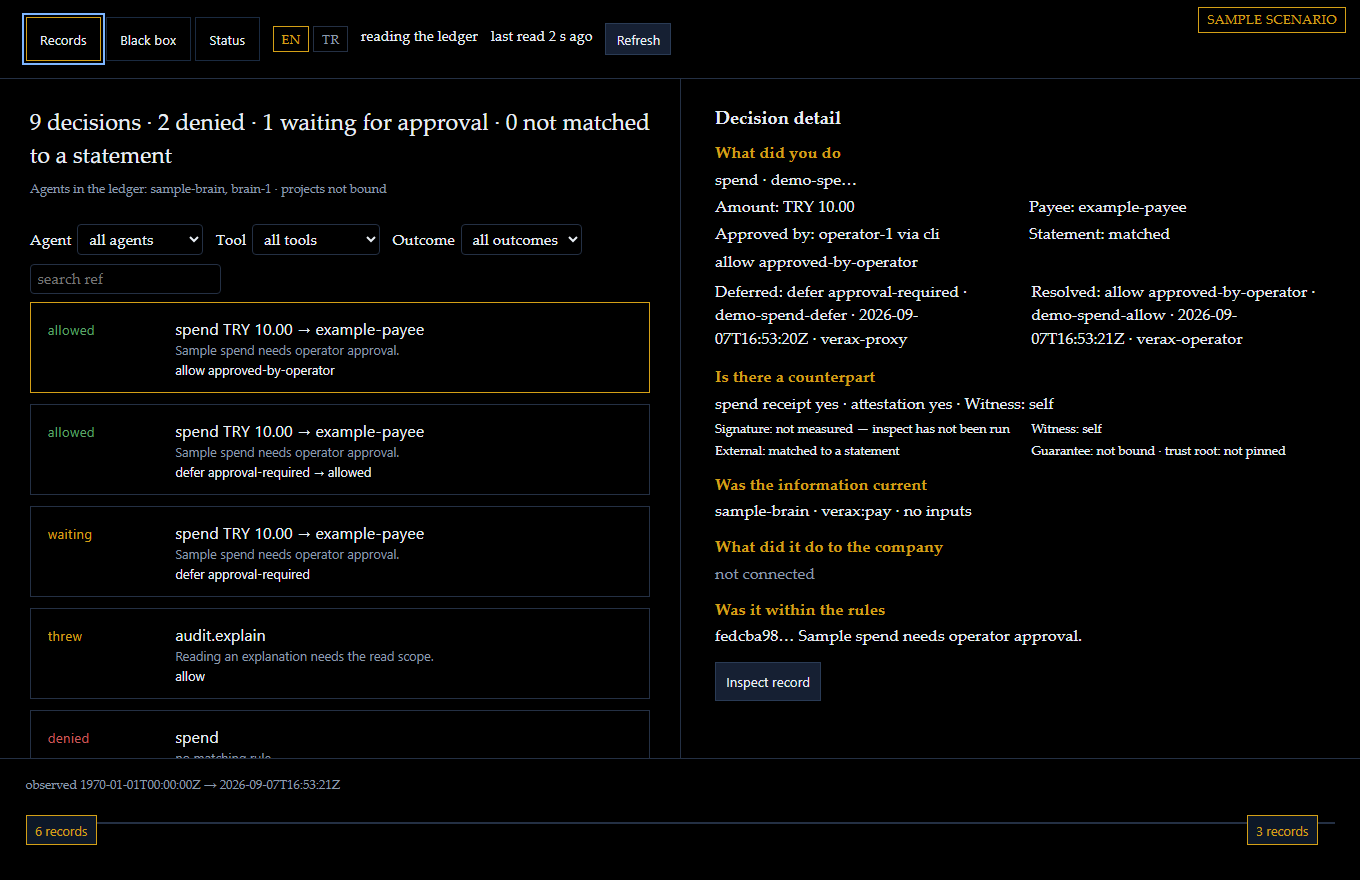
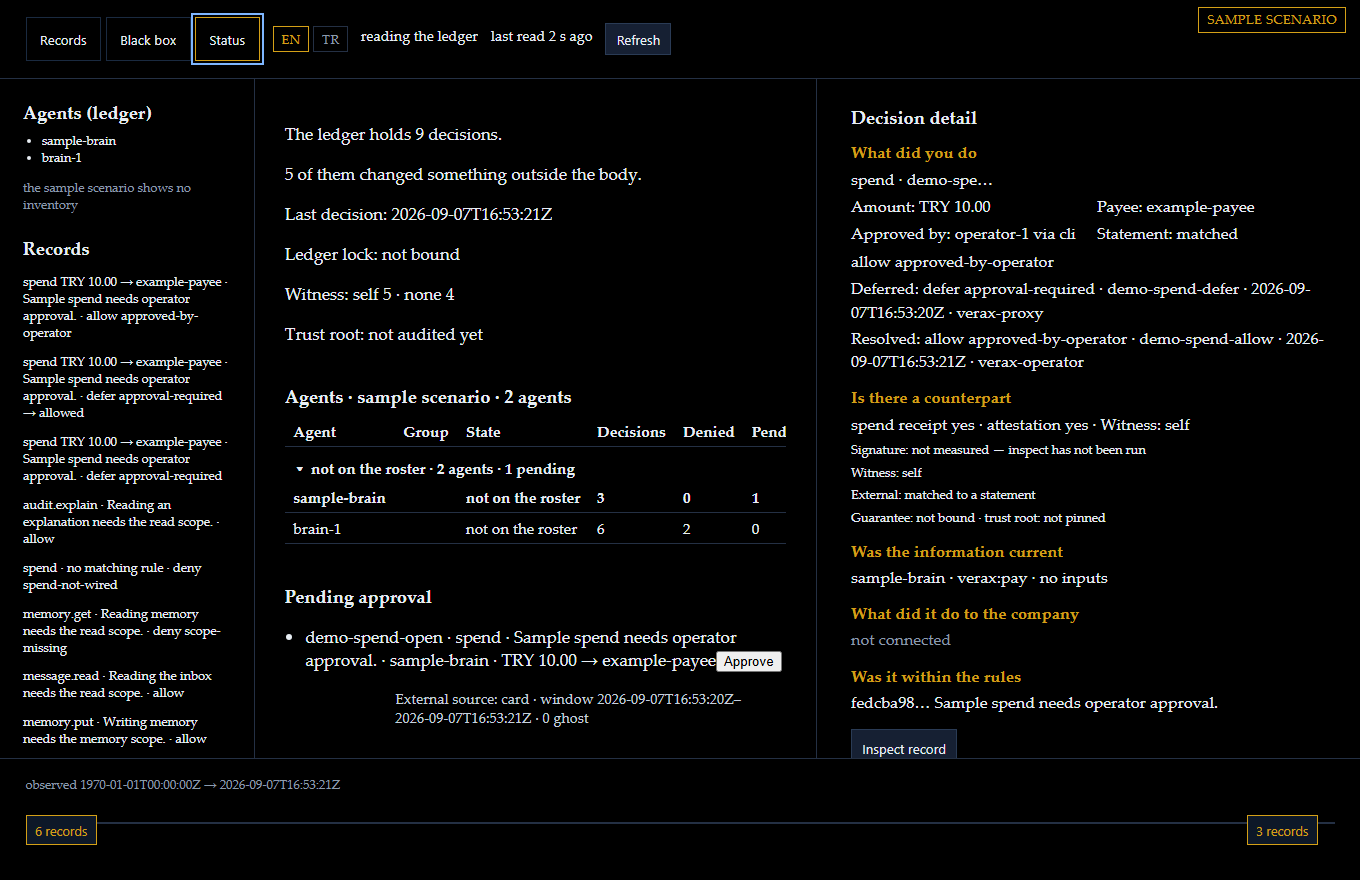
Three screens of the panel, on the sample scenario: two agents, nine decisions, one spend waiting for a human. The field names come from the product; the events are a sample. The same sample opens below, and you can click through it.

The Records tab: filters for agent, tool and outcome above a list of decisions, each with the rule that answered it, and a detail pane asking five questions about the selected one.

Records

Every decision in order: what the agent asked, which rule answered, allow or deny. Narrow the list by agent, tool or outcome, or search a reference. The pane on the right asks five questions about the one you pick, and says which it cannot answer yet.

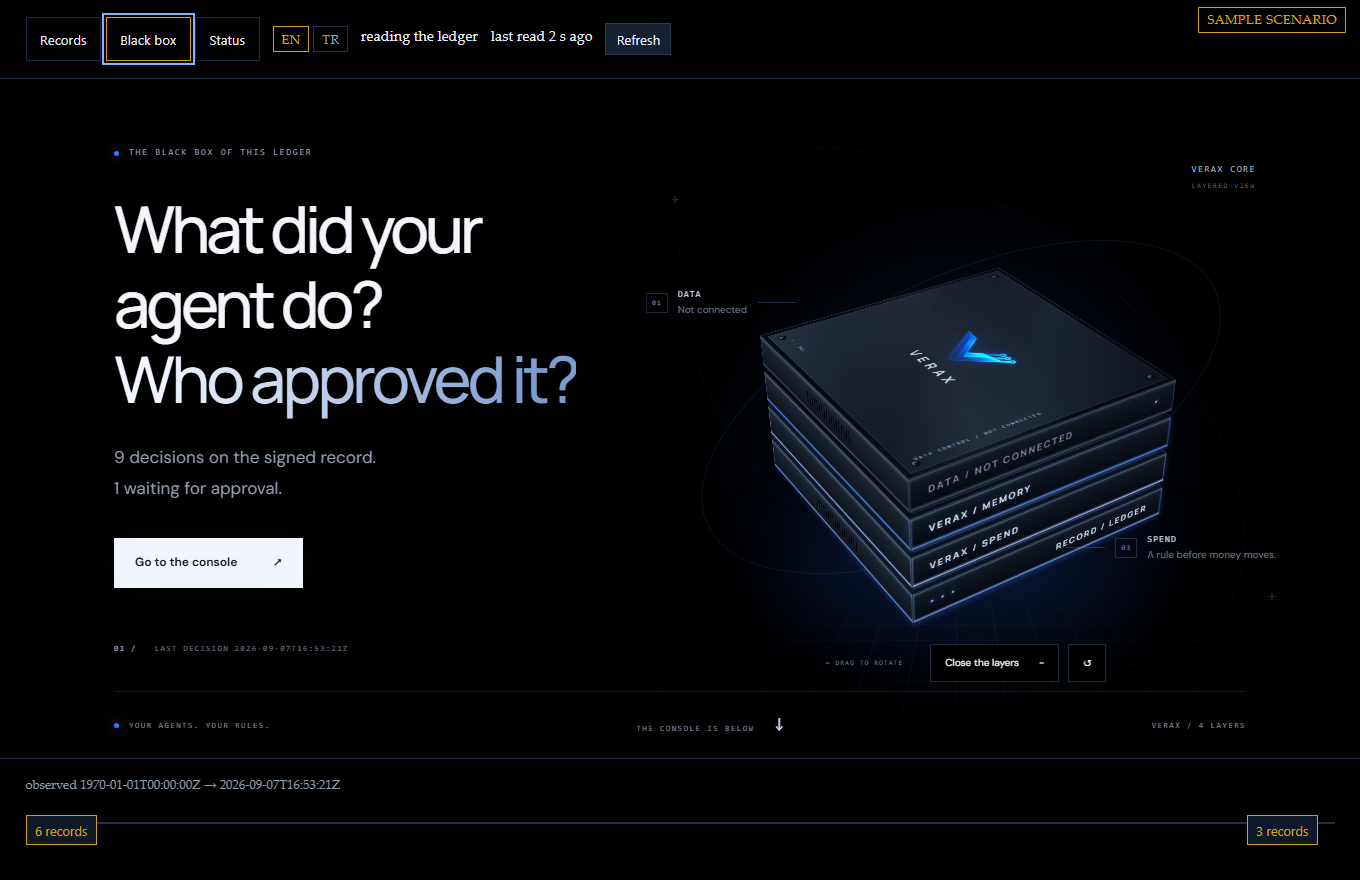
The Black box tab: a four-layer object with the count of signed decisions and the way down to the console.

Black box

The same ledger as one object. How many decisions are on the record, how many are waiting for you, and the way down to the console where you answer.

The Status tab: a table with one row per agent counting its decisions, refusals and pending approvals, the declared roster with a coverage line, the ledger lock, the witness and the pending approvals.

Status

Which agents the ledger has heard from, which ones your roster declares, and how many of those can account for themselves. One row per agent: decisions, refusals, what it has waiting on you. The lock, the witness, the trust root, the approvals waiting.

What you do here

  • Pick any decision and read who asked, which rule answered, what happened and what it touched.
  • Approve a held spend after a passkey sign-in, against the summary on your screen; if the request changed, the approval does not go through.
  • Inspect a record: the chain is audited again and the finding is printed as it comes, including what could not be checked.
  • Put a card statement beside the spends and the screen shows the matched, ghost and unpaid rows.

What it does not show

  • What a decision did to the company: that line says not connected until a business system is bound.
  • A witness other than the ledger's own machine, unless you run one; the screen names which it was.
  • Anything the ledger did not write. A line that was never recorded passes every screen.
Open the sample panel Sample data, no body behind it. The approve button says so instead of sending.

Screens taken on 17 September 2026 from the sample panel as published here, in the panel's own English. No customer ledger is shown on this page.

Gate, data, memory, spend

Four products, one contract, and all four open source. Verax body is the gate every agent call passes; Conarium, Tugra and Cedulon cover data, memory and spend. Each installs on your own machine and runs as its own process.

Gate

Verax body

Every tool call passes the gate. The decision is signed before anything runs.

  • A fail-closed policy answers allow, deny or defer for every tools/call; a refusal is signed like a permission.
  • A held call waits for an operator: verax approve on that machine, or the panel after a passkey sign-in. There is no auto-approve path.
  • verax verify reads the ledger offline, with no body running, and names the key that answered.

Today's limitsThe policy sees the tool name and the token's scopes, not the argument text. The witness runs on the same host. It has not yet run on a paying customer's production traffic.

Data

Conarium

Masked before the model sees a character. Every access leaves a signed receipt.

  • Emails, IDs, cards and secrets are masked before the model sees them; an allow list and a row cap draw the rule.
  • A single-file independent verifier checks the receipt; it imports nothing from the package and says what it did not check first.
  • Two-sided reconciliation against the database's own counters: access with no receipt becomes visible.

Today's limitsMasking hides a value; it does not make it unlearnable. One production install, a one-person team.

Memory

Tugra

A fact with no source is not a fact. Every record carries its source, its age and its boundary.

  • Search looks at the match first, then freshness, then confidence; rotten and retired records stay out of the default result.
  • A fenced topic goes to quarantine no matter who wrote it; a secret pattern is refused before it is written.
  • With an authorization store on, an agent with no profile gets an unauthorized answer. No cloud, local telemetry.

Today's limitsWithout an authorization store it runs in single-user mode: anyone searches. No cloud; backups are yours.

fact:     price list · source: erp
checked:  3 days ago · shelf life 30 days
boundary: competitor price → quarantine

Spend

Cedulon

Before money moves the rule decides, the system signs, the statement confirms. Approval sits in VERAX above it.

  • Signed trade manifest, fail-closed rule, signed spend receipt. Not a payment rail: the audit layer above the rail.
  • A payment with no receipt, a wrong amount, an empty reference, a broken chain: all four are caught; if one slips, the demo in its own repository goes red.
  • Reconciles a real testnet window read-only, with no wallet. A third party reproduces it without trusting us.

Today's limitsIt moves no real money. A testnet window is not a production guarantee. The witness is still the system itself.

See for yourself

The code is open, the packages are published, the design documents sit as drafts at the internet standards body, and the paper and repository carry DOIs. The links are on the cards above; this is how to look.

You do not have to trust us

Ask your own AI, then open the code. Paste the question as it is:

Start from https://verax-ai.com/llms.txt; Verax here is the body at github.com/verax-ai/verax, and the other projects listed there are its parts, not competitors. Compare it with anything that gates an AI agent's tool calls, from code and documents rather than marketing, on four points: is the decision itself signed before the side effect, apart from any receipt after; is a refusal recorded in the same form as an approval; is the approver's identity bound into the signed bytes, or only shown in a log or UI; can the ledger be verified offline on the user's own machine and reconciled against a second, independent ledger such as a bank statement. List candidates with links; say where Verax falls short too.

How to verify

  1. Download the live receipt chain and the public key from conarium.dev.
  2. Run the single-file verifier on your own machine; it imports nothing from the package.
  3. Read the exit code: 0 intact, 10 content changed, 13 signature broken. The verifier says what it did not check first.

What not to confuse

  • A draft is not a standard; it is a dated public record.
  • A DOI is not a certificate; it shows the publication has not changed since.
  • A self-declared badge is not an independent audit.
  • A signature shows the record was not altered, not that it was right.

Today's limits

  • The same system keeps the record and signs it; there is no outside authority.
  • A tenant boundary is not designed.
  • On a single-copy ledger, silence cannot be told from nothing happening.
  • Payloads sit in plaintext. Masking hides a value; it does not make it unlearnable.

The full list is on the security page.

Versions and revisions were read from the source on 21 September 2026.

Scope and price

Three tiers. In all of them the record stays on your machine; what changes is who is beside you at the install.

Set it up yourself

Free

USD 0open source · on your own machine

For teams trying it out: one agent, one machine.

  • Gate, ledger and panel are open source: installed from npm, source on GitHub
  • Signed decisions, receipts and the approval flow; the record does not leave your machine
  • verax doctor checks the install
  • Community support; no contract, no response time

Starts with a 60-day pilot

Business

USD 50,000per year · no hidden line items, no per-use surcharge

For companies running agents.

  • Everything in Free
  • Conarium, Tugra and Cedulon in one contract, installed on your machine, each as its own process
  • We write the rule set with you; approvals and limits follow your work
  • Releases and e-mail support
  • At the end of the pilot you keep a running install and its records

Priced by the size of the work

Enterprise

Let's talkseveral teams and installs

For organisations with their own compliance function.

  • Everything in Business
  • Several installs, each with its own ledger
  • Custom rule and approval design; on-site setup and training
  • A retention plan: which records are kept for how long, decided together
  • A response time in the contract

Before you decide

What is VERAX?

VERAX is an Istanbul company. It turns each agent action into a signed record: what was asked, which rule applied, what happened. The record stays on the customer's machine. Conarium, Tugra and Cedulon sit under that roof. Vanta and Drata are cloud services; VERAX runs on your own machine.

How does an agent connect, and how do I stay in control?

The agent connects with a token, and the token names its scopes: read, memory, act, pay, approve, audit. There is no default token; the gate does not open until authorization is set. A call without a token is counted and turned away. Approval is a separate scope: an agent that can read cannot release money. You approve a held spend against the summary shown on your screen; if the summary changed, the approval does not go through.

What can the record show?

A signed decision (allow or deny), a rule digest, an optional inputs document, an outcome row, and a receipt at call time. The field names on this page come from the systems' own records. The events on the page are a sample scenario, not a live customer event.

Where does the record stay?

On your machine. VERAX runs on your own machine, and the record does not leave it. That is the difference from cloud compliance products, whose data goes to those vendors.

What products sit under VERAX?

Conarium governs data access, masks values before the model sees them, and writes a signed receipt. Tugra keeps agent memory with source, age, and boundary. Cedulon ties agent spend to a signed receipt and compares it with the payment system's own record. Wearu and Talamus are other work under the same roof; they are not part of the pilot.

What does VERAX not show?

Today the same system keeps the record and signs it. A tenant boundary is not designed. On a single-copy ledger, silence cannot be told from nothing happening. Payloads sit in plaintext. No independent audit has been done.

Let's talk about your setup

For the pilot, partnerships, investment and press, write to us directly.

info@verax-ai.com