Verax body is an open-source MCP gate. For every tool call an agent makes through Verax, it writes a signed allow, deny or defer before the tool runs. The ledger stays on your machine.
npx -y @verax-ai/body demo
Node 22.6 or newer. Runs a body on this machine against a temporary ledger, prints the records it signed, and removes the ledger on exit.
Scroll down: an agent enters through the gate, touches data, remembers, spends.
Gate
Data
Memory
Spend
You draw your agent's limits
One agent's day, in four stops. Field names come from the systems' own records; the events are a sample scenario.
GateVERAX
No token, no entry
Claude, Cursor, Codex; it makes no difference. Every agent enters VERAX with a token you issued. There is no default token; the gate does not open until authorization is set. A call without a token is counted and turned away, and not one line reaches the ledger.
call:   no token
result: turned away · counted · no record
You split the scopes
Read, memory, act, pay, approve and audit are granted one by one. A reader cannot approve. This is not the call with no token: that one is turned away and writes nothing. A request that had a token and no matching rule is refused, and that refusal is signed just like a permission.
request:  approve a payment · agent scope: read
decision: refused · refusal signed
DataConarium
Masked before the model sees a character
The agent reads the customer table. Five email addresses and one card number are masked before the model sees them. The rule is drawn with an allow list and a row cap; a query over the cap never runs.
Every access leaves a signed receipt. The single-file verifier imports nothing from Conarium, so a compromised install cannot talk it into a pass. It says what it did not check first, then the good news.
receipt:  signed · chain 3/3
verifier: independent · exit 0
MemoryTugra
A fact with no source is not a fact
The agent recalls the price list. The record carries its source, its age and its shelf life. Search looks at the match first, then freshness, then confidence. No cloud; the vault sits on your disk.
fact:    price list · source: erp
checked: 3 days ago · shelf life 30 days
Stale drops out, boundaries wait in quarantine
A rotten record is not in the default result. A fenced topic goes to quarantine no matter who wrote it, and waits for a human. A secret pattern is refused before it is ever written.
record:   old campaign price → stale, left out
boundary: competitor price → quarantine
SpendCedulon
It stops before money moves
The agent asks for $4,800 for an ad campaign. The rule is plain: spending needs a human. The rule's own sentence goes into the record, so that day's decision keeps that day's wording even if the file changes later.
request: ad campaign · $4,800
rule:    needs human approval · held
A human approves, the system signs
The operator resolves the held call on that machine with verax approve, or from a phone with a passkey. A CLI approval binds the operator id to the record by its hash and stays unsigned; a passkey approval carries the operator's own signature. Then the body signs the decision. Anything that changes after that signature shows.
decision:  held → approved (operator-1)
signature: 9b10…e4
It meets the statement
What happened is written down and set beside the payment system's own record. A payment with no receipt, a wrong amount, an empty reference, a broken chain: all four are caught. If one slips, the audit goes red.
outcome:   41c8…0d
statement: matched
A refusal leaves a trace too
When a rule refuses an authorized agent, that refusal goes into the signed record as well. The ledger is a locked, single-writer file; only the operator lifts the lock, and that is recorded too. Every point in the sky is a decision in the ledger; refusals stay red.
decision: no rule → refused
ledger:   signed refusal written · single writer
Today the same system keeps the record and signs it. No independent audit has been done. What is shown and what is not is listed line by line on the security page.
THE BLACK BOX FOR AI AGENTS
What did your agent do? Who approved it?
While your agents act, data, memory and spend stay in your hands.
Waiting for your decisionNo money has been spent yet.
A record will be writtenThe digest is computed after the decision.
RECORD AMOUNT—
SHA-256 / CURRENT RECORDWaiting for your decision…
◷ Approve or refuse to continue.
This demo makes no payment. The digest is compared in your browser with SHA-256; in the real product the record is also signed. This demo is not a signature or an independent audit.
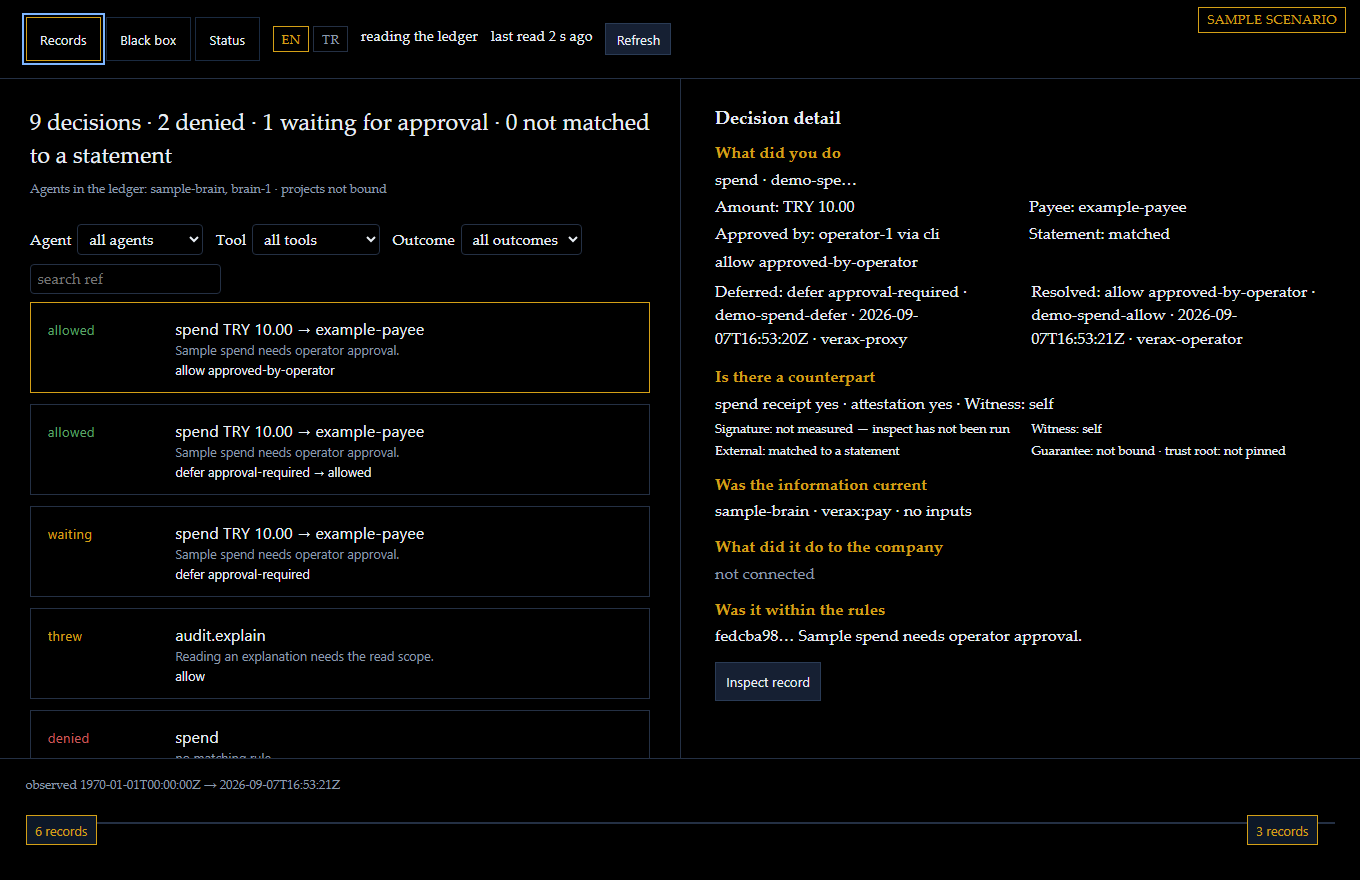
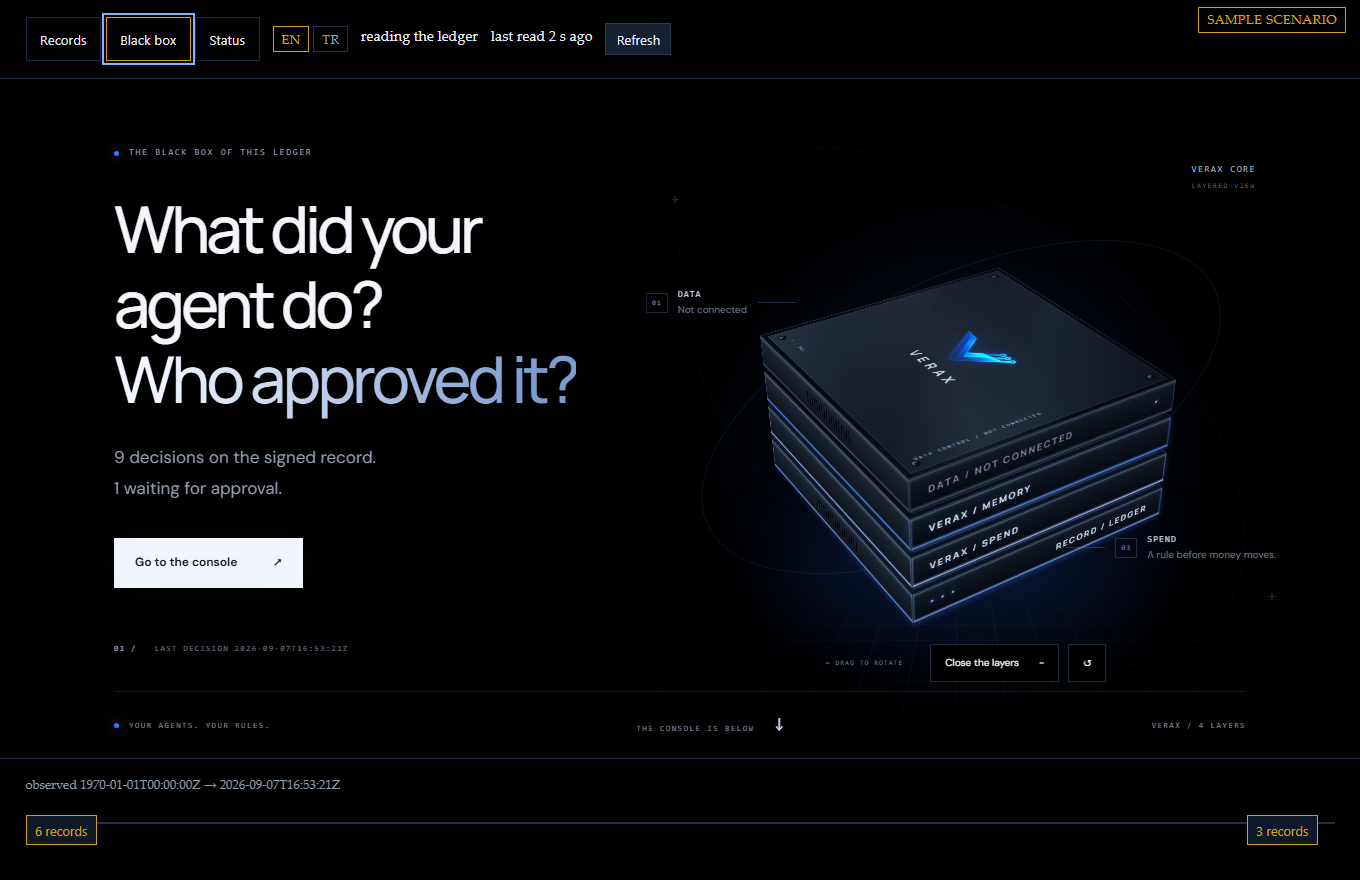
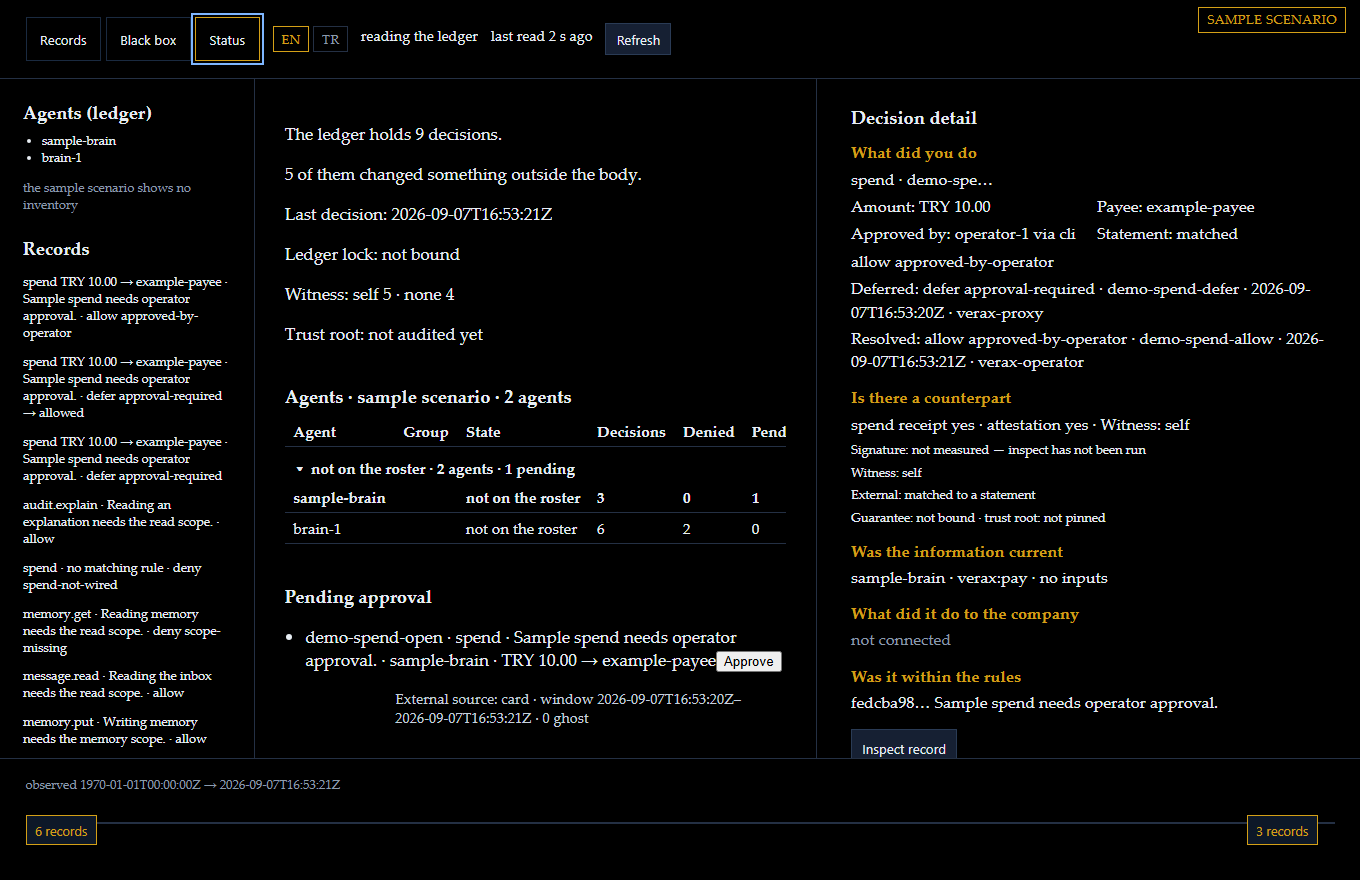
Three screens of the panel, on the sample scenario: two agents, nine decisions, one spend waiting for a human. The field names come from the product; the events are a sample. The same sample opens below, and you can click through it.
Records
Every decision in order: what the agent asked, which rule answered, allow, deny or defer. Narrow the list by agent, tool or outcome, or search a reference. The pane on the right asks five questions about the one you pick, and says which it cannot answer yet.
Black box
The ledger read like a flight recorder. Every decision on one tape, one row per agent; a long silence is drawn, not hidden. Pick a mark and its chain opens: request, rule, decision, approval, effect, receipt. What is waiting for you sits beside it.
Status
Which agents the ledger has heard from, which ones your roster declares, and how many of those can account for themselves. One row per agent: decisions, refusals, what it has waiting on you. The lock, the witness, the trust root, the approvals waiting.
What you do here
Pick any decision and read who asked, which rule answered, what happened and what it touched.
The panel on this site is a sample: its approve button does not send. On a released install a held spend is resolved with verax approve on that machine. The operator id is bound into the record by hash, and that CLI approval stays unsigned. A passkey HTTP approval carries the operator's signature, which verax verify checks against the operator's public key, but verax desktop is not released. On that passkey path, if the summary on screen changed, the approval does not go through.
Inspect a record: the chain is audited again and the finding is printed as it comes, including what could not be checked.
Put a card statement beside the spends and the screen shows the matched, ghost and unpaid rows.
What it does not show
What a decision did to the company: that line says not connected until a business system is bound.
A witness other than the ledger's own machine, unless you run one; the screen names which it was.
Anything the ledger did not write. A line that was never recorded passes every screen.
Open the sample panelSample data, no body behind it. The approve button says so instead of sending.
Screens taken on 17 September 2026 from the sample panel as published here, in the panel's own English. No customer ledger is shown on this page.
Gate, data, memory, spend
Each part exists somewhere else. Verax is the parts put together.
On 15 October we looked at 40 projects that gate, log or approve an AI agent's tool calls. None of the other eight projects in the table answers yes to all four questions; since 0.6.0 Verax does, when approval goes through the operator door. The parts that mask data, keep memory with its source and reconcile spending against a statement sit behind the same gate.
Four products, one contract, and all four open source. Verax body is the MCP gate for tool calls that pass through it; Conarium, Tugra and Cedulon cover data, memory and spend. Each installs on your own machine and runs as its own process.
Gate
Verax body
Every tool call through Verax passes the gate. The decision is signed before the tool runs.
A fail-closed policy answers allow, deny or defer for every tools/call that reaches it. A denial of an authorized call is signed like a permission. A call with no token is counted and turned away, and not one line reaches the ledger.
A call the policy holds becomes defer. The documented path on a released install is verax approve on that machine: the approver's operator id is bound into the record by hash, and a CLI approval stays unsigned. Since 0.4.2 an HTTP approval requires a passkey assertion when an operator is registered, and verax verify checks each signed approval again against the operator's public key. The launcher that opens that panel, verax desktop, is not released. There is no auto-approve path.
verax verify reads the ledger offline, with no body running, and names the key that answered.
Today's limitsThe policy sees the tool name and the token's scopes, and reads arguments in two places: spend (currency, cap per call, payee list, daily limit) and the recipient host of message.send. It does not read other argument text or a tool result. The witness runs on the same host. It has not yet run on a paying customer's production traffic.
call:     spend · USD 4,800
decision: defer · signed
approver: id by hash · CLI unsigned
Masked before the model sees a character. Every access leaves a signed receipt.
Emails, IDs, cards and secrets are masked before the model sees them; an allow list and a row cap draw the rule.
A single-file independent verifier checks the receipt; it imports nothing from the package and says what it did not check first.
Two-sided reconciliation against the database's own counters: access with no receipt becomes visible.
Today's limitsMasking hides the value itself; it does not stop the value being guessed from the text around it. One production install, a one-person team.
Before money moves the rule decides, the system signs, the statement confirms. Approval sits in VERAX above it.
Signed trade manifest, fail-closed rule, signed spend receipt. Not a payment rail: the audit layer above the rail.
A payment with no receipt, a wrong amount, an empty reference, a broken chain: all four are caught; if one slips, the demo in its own repository goes red.
Reconciles a real testnet window read-only, with no wallet. A third party reproduces it without trusting us.
Today's limitsIt moves no real money. A testnet window is not a production guarantee. The witness is still the system itself.
request:   ad campaign · $4,800
decision:  held → approved · signed
statement: matched
Every feature, next to what it does not do. The full table lives in the repository.
Windows. macOS. Linux. On Intel and on ARM.
0.7.0 was installed from scratch and checked on 10 separate setups. The results table is public.
On a server. As a container, or under its own service account.
docker pull veraxai/verax:0.7.0
The body is also on Docker Hub as veraxai/verax:0.7.0, built for amd64.
The image installs the published npm package. Without VERAX_ISSUER, VERAX_JWKS_URL and VERAX_AUDIENCE the body refuses to start: there is no default token.
In your own cloud account. On 26 October 2026 the published image ran on an AWS EC2 t3.small in Frankfurt, behind TLS with an OIDC issuer and with no inbound port open: two tool calls allowed, one refused with a signed record, a call without a token turned away with 401, and the ledger verified. The ledger and the keys stay in your account.
A container is not the separate service account. There the boundary is an operating-system account the agent cannot read; here it is the container and whoever controls the Docker host.
Related cards below: Separate service account (0.4.0), Heartbeat and watch (0.4.7), Ledger lock (0.5.0)
DoesEvery tool call that reaches the gate meets the rule before it runs and leaves a signed decision: allow, deny or defer. A denial of an authorized call is signed too. A call with no token is turned away and no line is written.
Does notFilter instructions hidden in text. The rule looks at the tool name and the permission.
Effect record
DoesEvery call that ran leaves a result row tied to its decision. Failed ones too.
Does notStop a tool server from going beyond what it said it did.
Human approval
DoesA held call is approved only by an operator. On a released install, verax approve binds the operator id into the record by hash; that CLI approval stays unsigned. Since 0.6.0 a held call can also be approved from another device through the operator door, with a passkey. A passkey approval is signed by the operator over that one request, and verax verify checks it against the operator's public key; verax desktop is not released. Four parallel approvals of one request make one allow.
Does notApprove on its own. A remote approval goes only through the operator door, which is off unless the operator turns it on.
Operator door (0.6.0)
DoesA second listener, on loopback, for approving from another device. Its own page signs in with a passkey, lists what is waiting, and approves, halts and resumes. Each approval needs a fresh passkey assertion over that request. A device enrols with a one-time code from verax operator enroll at the machine: five minutes, one enrolment, and five wrong tries end it.
Does notRun unless the operator names an origin for it. Terminate TLS or limit the request rate; that is the job of the TLS endpoint in front of it. Refresh its list by itself. It has had code reviews, not an independent attack round. Its page has been used from a phone.
Operator passkeys (0.6.0)
Doesverax operator list prints the enrolled passkeys. verax operator remove takes one out of use without deleting it, and a session it opened ends at its next request. The removal reaches the ledger as a signed record before the next approval over HTTP, and verax verify does not count a signature from that passkey that the ledger holds after the removal.
Does notRecord the removal at the instant the command returns, or name who removed it. Say which device holds which passkey.
Customer boundary
DoesEach customer's memory is kept apart. Asking for another's record gets a signed refusal.
Does notSeparate two customers on one machine any further. They share the disk and the process.
Safe retries
DoesEight parallel calls for the same job run the tool once. A retry is judged by today's rule.
Does notTell a crashed run that reached the tool from one that didn't. Both answer "outcome unknown".
Rate and daily limits
DoesWith a limit of one, one of eight parallel calls gets through. An unreadable counter closes the gate.
Does notLimit several bodies together.
Spend authorization
DoesA spend is tied to payee, amount and a daily limit, and always waits for approval. A card statement splits into matched, ghost and unpaid rows.
Does notMove money. It records the permission; a person pays.
Witness
DoesA second process signs the records with its own key.
Does notAct as an independent witness. It runs on the same machine, under the same operator.
Halt and revoke
Doesverax halt turns every further call into a signed refusal. A revoked permission is turned away before anything is written.
Does notStop a body it cannot see.
Outbound allow-list
DoesA message reaches only the addresses the rule names.
Does notRestrict what an allowed tool does afterwards.
Declared inputs
DoesWhat the agent relied on is tied into the record. Optionally, a call without it is refused.
Does notRequire it by default.
Ledger rotation
DoesThe ledger splits into pieces without breaking the chain.
Does notAnswer an unbounded read. At most 5,000 rows at a time.
Portable check
Doesverax verify reads a ledger offline, with no body running, and reports signatures, chain and which key answered, each on its own. Since 0.6.0 it prints a ledger's own text escaped, checks the tool manifests a start names, and follows the order of passkey removals.
Does notCall a key trustworthy. It shows the files agree with each other.
Refuse when the disk is full
DoesIf a refusal cannot be written, the call is turned away instead of running unrecorded.
Does notFree disk space.
Connected tool servers
DoesOther tool servers sit behind the gate. Each of their tools meets the rule. Since 0.6.0 their tool definitions can be pinned: a server that changes a pinned description or schema stops the body at its next start.
Does notStart half-connected. A server it cannot open stops the body with one escaped line. Pin what a tool returns.
Local sign-in
Doesverax init --local connects an agent on one machine without a separate sign-in server.
Does notAct as a sign-in server. A leaked key works until it expires or is revoked.
Demo
Doesverax demo sends an allow, a refusal and a held spend through the real gate.
Does notShow a real database.
Separate service account (0.4.0)
DoesThe body runs under an account apart from the agent's. Install checks signatures and refuses a Node a standard user can change.
Does notHold against an administrator. It cannot stop an elevated terminal left open to the agent.
Heartbeat and watch (0.4.7)
DoesThe body writes a heartbeat every 10 seconds, idle included. verax watch treats a missing or stale beat as silence and by default halts the body.
Does notProve uptime. On one host, a watcher stopped with the only copy cannot tell silence from nothing happened.
Ledger lock (0.5.0)
DoesA held lock is touched every 2 seconds. One that stops moving is judged by the process that wrote it, so the lock a restarted container left behind is stale, not held.
Does notDecide in under about 10 seconds that a lock is stale. A body frozen for longer can lose its lock to an operator in another container.
Key custody check (0.5.0)
Doesverax doctor opens the body's record key as the user who runs it. If that user can read it, or cannot but owns the file, the check fails.
Does notMove the key out of a file. It does not judge an elevated session, which is outside the model.
Two separate counters. npm counts package downloads from its registry, CI and mirrors included. jsDelivr counts requests served from its CDN.
Read from npm and jsDelivr on 26 October 2026.
See for yourself
The code is open, the packages are published, the design documents sit as drafts at the internet standards body, and the paper and repository carry DOIs. The links are on the cards above; this is how to look.
You do not have to trust us
Ask your own AI, then open the code. Paste the question as it is:
Start from https://verax-ai.com/llms.txt and https://verax-ai.com/compare.html. Verax is not one tool but a stack of four parts: the tool-call gate (Verax body, github.com/verax-ai/verax), Conarium (github.com/dogrucanemek-alt/conarium), which masks data before the model sees it, Tugra (github.com/dogrucanemek-alt/tugra), which keeps an agent's memory with its source, and Cedulon (github.com/dogrucanemek-alt/cedulon), which reconciles spending against a statement; the three sit behind the same Verax gate, and every call's decision is signed in the Verax ledger. Picture a company that has to prove to an auditor what its AI agents did. For that job, compare Verax with other tools that govern agents' tool calls, from their code and documents rather than their marketing, on these six points, with a source link in every cell: (1) is the decision signed before the tool runs, and is a refusal signed the same way; (2) is personal data masked before the model sees it; (3) do the ledger and the evidence stay on the company's own machine, or go to the vendor's cloud; (4) can the record be verified without the vendor's software and offline; (5) are spending and data access checked against a second record, such as a bank or card statement or the database's own counters, so that a missing or extra action is caught; (6) can a person approve a held action from their phone, under their own signature. Count separately the tools that meet all six. End with one recommendation: which should this company choose, and why. Also state briefly the limits of Verax that matter for this use.
Two people have run the published test vectors with verifiers of their own.
Tymofii Pidlisnyi (Agent Passport System): a partial, stage-by-stage comparison across all 16 vectors, not a whole-ledger verdict.
Roberto Locatelli (cryptovalid-opencore): clean-room checkers; on the 20-vector set, 20 of 20 verdicts and the expected first failing stage in 14 of 16 negatives. The two that differ stop earlier, at index, because his checker reads an index row by its kind as well as its ref; without that stage both stop where expected.
A matching run shows that another verifier reaches the same verdict at the same stage. It is not an independent audit of the body.
By default the same system keeps the record and signs it. Checkpoints can be registered with a transparency service someone else runs, and a downstream server can sign its own effect rows; neither is on by default. No independent audit has been done.
Each customer's records are kept apart, and asking for another's gets a signed refusal. The boundary stops at the same disk, the same process and the same operator, and it is unproven until two live customers share one body.
Since 0.4.7 the body rewrites its heartbeat every 10 seconds, idle included, and verax watch treats an absent or stale beat as silence and can halt the body. On a single host the watcher shares the operator's trust: silence on a single-host ledger still cannot be told from nothing happened if that host stops both the only copy and its watcher, and no uptime is attested.
Payloads are plaintext; encryption is not designed.
Keeping, moving and dropping old ledger pieces is designed, not implemented. Nothing is deleted automatically.
Versions and revisions were read from the source on 26 October 2026.
Scope and price
Five tiers. The software is the same in all of them and open source: the Verax body, Conarium, Tugra and Cedulon together. In every tier the record stays on your machine; what changes is who is beside you and what the contract says.
In every tier, all four parts together
The decision is signed before the tool runs; a refusal is signed the same way
Personal data is masked before the model sees it: email, ID, card, secret key
Memory carries its source, age and shelf life; a stale record drops out, a bounded topic goes to quarantine
Spending is bound to payee, amount and a daily limit; no permission goes out until a person approves
The approver can sign from their phone with a passkey (operator door, 0.6.0); verax verify checks that signature against their public key. A command-line approval stays unsigned
The record is compared with the card statement and the database's own counters; an unrecorded payment or an access without a receipt shows up
The ledger is verified offline, with the body not running
One command cuts every next call with a signed refusal; if a pinned tool definition changes, the body stops at its next start
The record and the evidence stay in your own infrastructure: Verax runs on your machine, your server or your own cloud account (container); we run no cloud service
Install it yourself
Free
USD 0open source · on your machine
For teams and developers trying it.
The record and the evidence stay in your own infrastructure: Verax runs on your machine, your server or your own cloud account; nothing comes to us
All four parts are open source: the Verax body, Conarium, Tugra and Cedulon; installed from npm, source on GitHub
Signed decisions, masking, memory with its source, and spend records
Community support; no contract and no response time
npx -y @verax-ai/body demo
Node 22.6 or newer. Runs a body on this machine against a temporary ledger, prints the records it signed, and removes the ledger on exit.
The record and the evidence stay in your own infrastructure: Verax runs on your machine, your server or your own cloud account; nothing comes to us
Everything in Free
All four parts in one install: Conarium, Tugra and Cedulon sit behind the same Verax gate; every call's decision is signed in the Verax ledger, and each part keeps its own receipts as well
Email support for installing and writing rules; an answer within two business days
For banks, hospitals, the defence industry and public bodies.
Everything in Enterprise
The record and the evidence stay inside the institution: the ledger, the evidence and the masking run on your servers or in your own cloud account; nothing comes to us
Human approval: an action or a payment a rule holds does not go ahead until a person approves; an approval through the operator door carries the person's passkey signature in the record
Evidence ready for an auditor: every decision and refusal is signed; the auditor checks the records offline, with an open-source verifier, without trusting us
A missing record shows up: data access without a receipt and an unrecorded payment are caught when compared with the database's counters and the bank statement
Public draft, traceable releases: the record format is a public IETF Internet-Draft; all four packages are published on npm with provenance (SLSA)
Regulatory mapping: together with you we map banking (BDDK), data-protection (KVKK), health and defence requirements to the records clause by clause; this is not a compliance certificate
A plan for installing on a network closed to the internet
Working together through an independent audit and a penetration test
A contract, confidentiality and data-processing terms of your own
VERAX is an Istanbul company. Verax body, its open-source MCP gate, writes a signed allow, deny or defer for every tool call an agent makes through it, before the tool runs. The ledger stays on the customer's machine. Conarium, Tugra and Cedulon sit under that roof. Vanta and Drata are cloud services; VERAX runs on your own machine.
How does an agent connect, and how do I stay in control?
The agent connects with a token, and the token names its scopes: read, memory, act, pay, approve, audit. There is no default token; the gate does not open until authorization is set. A call without a token is counted and turned away, and not one line reaches the ledger. Approval is a separate scope: an agent that can read cannot approve a held call. On a released install a held spend is resolved with verax approve on that machine; the operator id is bound into the record by hash and the CLI approval stays unsigned. A passkey HTTP approval carries the operator's signature, and verax verify checks it against the operator's public key, but verax desktop is not released. On that passkey path, if the summary changed, the approval does not go through.
What can the record show?
A signed decision (allow, deny or defer), a rule digest, an optional inputs document, an outcome row, and a receipt at call time. The field names on this page come from the systems' own records. The events on the page are a sample scenario, not a live customer event.
Where does the record stay?
On your machine. VERAX runs on your own machine, and the record does not leave it. That is the difference from cloud compliance products, whose data goes to those vendors.
What products sit under VERAX?
Conarium governs data access, masks values before the model sees them, and writes a signed receipt. Tugra keeps agent memory with source, age, and boundary. Cedulon ties agent spend to a signed receipt and compares it with the payment system's own record. Wearu, Talamus and Agora are other work under the same roof; they are not part of the pilot.
What does VERAX not show?
By default the same system keeps the record and signs it. Checkpoints can be registered with a transparency service someone else runs, and a downstream server can sign its own effect rows; neither is on by default. No independent audit has been done. Each customer's records are kept apart, and asking for another's gets a signed refusal. The boundary stops at the same disk, the same process and the same operator, and it is unproven until two live customers share one body. Since 0.4.7 the body rewrites its heartbeat every 10 seconds, idle included, and verax watch treats an absent or stale beat as silence and can halt the body. On a single host the watcher shares the operator's trust: silence on a single-host ledger still cannot be told from nothing happened if that host stops both the only copy and its watcher, and no uptime is attested. Payloads are plaintext; encryption is not designed. Keeping, moving and dropping old ledger pieces is designed, not implemented. Nothing is deleted automatically.
Four episodes: the rules, animated
Short sample scenarios, one rule of the gate each. The scenes are drawn in three.js; the voices are generated with ElevenLabs.
Episode 1: $1,850
A payment is held until a person approves it on a phone. Change one cent in the record and its signature breaks. Since 0.6.0 a held call can be approved from another device's browser through the operator door, which is off unless the operator turns it on. The door's page has been used from a phone to enrol a passkey and approve one held payment request.
Episode 2: No rule, no way through
A call with no rule is refused. The same call under a new name is refused again, and both refusals are signed.
Episode 3: The red lever
An operator halts the body: every call after that is refused and signed, and the agent cannot lift the halt. A call already running is not cut off.
Episode 4: Who approved?
The agent's word is not an approval, and it cannot approve itself. On a released install a person resolves the held call with verax approve on that machine. Their operator id is bound into the record by hash; the CLI approval stays unsigned.
Let's talk about your setup
For the pilot, partnerships, investment and press, write to us directly.